Terminal-native autonomous agent for secure code workflows
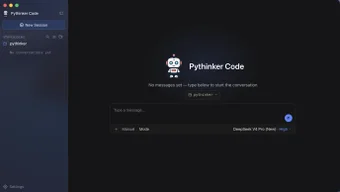
pythinker-code, built by PyModel, is an autonomous AI engineering agent for terminal and editor workflows. It indexes repositories, runs a planning, edit and execute loop, and integrates with the Model Context Protocol so language models can interact with local files and run tools. The app adopts a review-first approach, performing repository analysis and security scanning before suggesting patches. It targets software engineers, DevOps professionals, and AI researchers working on complex codebases.
What tasks can you actually use it for?
The tool implements a terminal-native engineering loop that plans, edits, and executes code across a repository, and it performs automated root-cause debugging alongside targeted patch proposals. It supports multi-step problem solving through subagent swarms, which lets users break large refactors into coordinated subtasks. Use cases include repository-scale maintenance, bug triage, and running scripted test sequences from the terminal environment.
How verifiable are its code changes in practice?
The tool follows a review-first architecture that couples automated code review and security scanning with git worktree isolation and granular permission gates. Those mechanisms let it run and verify patches in isolated worktrees before changes touch the main branch, and its root-cause diagnostics provide traces users can inspect when validating a fix. This design reduces the chance of accidental repository contamination during automated edits.
What inputs and environments affect its outputs?
The app runs on macOS (Apple Silicon and Intel), Linux, and Windows, and integrates with VS Code through a dedicated extension. It exposes an MCP server interface for hosts such as Claude Desktop and lists support for a range of model providers. Installation paths include Nix, Homebrew, npm, and pip, so deployment can follow local package workflows or CI-oriented setups without a single mandated installer.
Does it fit into existing engineering workflows?
The tool targets terminal-centric workflows and provides session management and repository indexing that map to command-line habits. It can act as an MCP backend for other tools and coordinate complex tasks, but it presumes familiarity with CLI tooling and git worktrees. Teams accustomed to editor-only, point-and-click assistants should plan for procedural changes when integrating the agent into code review and release pipelines.
Best suited for engineer teams that accept a terminal-first approach
The tool is a practical choice for teams that need diagnosis-oriented, controlled automation and that can manage MCP hosts and isolated worktrees. Its design favors practitioners comfortable with CLI workflows and explicit permission gates. Consider pairing generated edits with human review for high-stakes changes, and evaluate whether a terminal-centric agent matches your team’s collaboration and review practices.